
Webflow Pricing Explained for UAE Businesses in 2026
Share
Webflow pricing confuses many founders and marketing teams for one simple reason. Webflow does not price like traditional website platforms. It separates building, collaboration, and publishing into different plan types. If you treat it like WordPress hosting, you will pick the wrong plan. If you understand the system, you can build a scalable website stack without wasting budget.
Webflow also updates features and pricing over time. This guide is written to be practical and easy to revisit. The goal is that after reading it, you can choose the right Webflow plan confidently, explain it to your team or client, and avoid hidden constraints that slow growth later.
Why Webflow Pricing Feels Confusing
Most platforms bundle everything into one subscription. Webflow does not. Webflow separates the product into three layers: where you build, where you collaborate, and where you publish. That is why you will often see people paying for both a Workspace and a Site Plan at the same time. They are not duplicates. They solve different problems.
Here is the simplest way to think about it.
- Workspaces are for people and teams building and managing projects
- Site Plans are for publishing and hosting a specific website on a custom domain
- Ecommerce Plans are Site Plans designed for online stores
- Add ons extend what a published site can do, such as testing, analytics, and multilingual
If you remember only one thing, remember this: a Workspace is tied to the account and team, while a Site Plan is tied to a specific website.
The Three Webflow Plan Categories Explained
Webflow pricing is built around three core categories: Free, Site Plans, and Workspaces. Most confusion happens because users do not know which category they actually need.
Free Plan
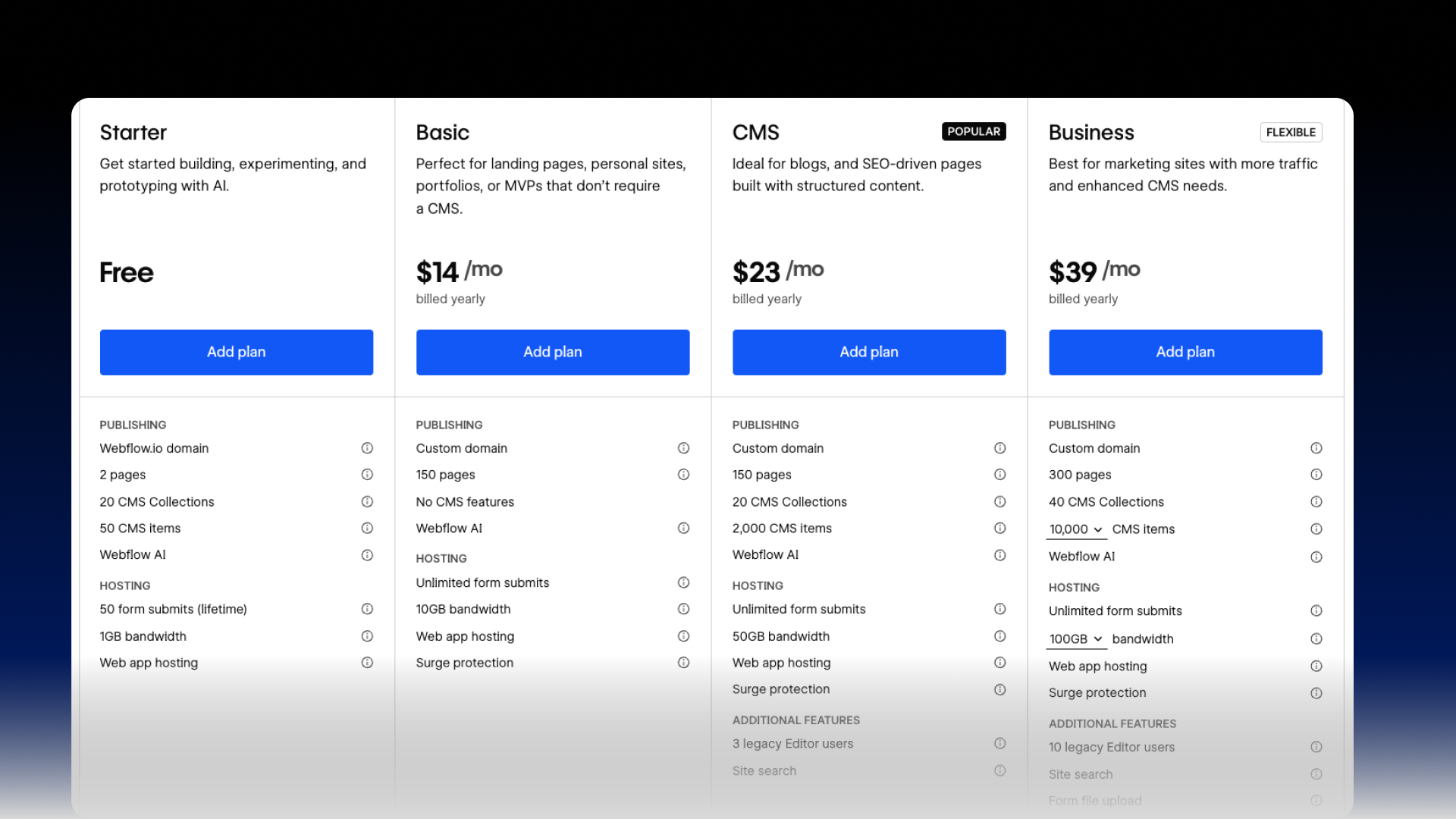
The Free plan is best treated as a design and learning environment. It is not a trial and it does not expire. It is useful for exploring the Designer, building layouts, creating CMS collections, and preparing a site for launch. But it is limited for real business use because you cannot publish properly on your own domain in a way that feels professional.
The Free plan limitations matter because they affect real marketing work. If a founder wants to ship quickly, but the plan limits pages or CMS items, the team starts making compromises that weaken SEO and content structure.
Key Free plan constraints to keep in mind
- You publish to a webflow.io subdomain, not a custom domain
- Limits apply to pages, CMS items, form submissions, and bandwidth
- It is suitable for prototypes, drafts, internal review, and learning
For businesses in Dubai aiming to rank, run ads, or build brand authority, the Free plan is a staging step, not a launch choice.
Site Plans
A Site Plan is what makes a Webflow website live on a custom domain. It is essentially hosting plus publishing capability plus the plan features for that site. Site Plans are priced per website. If you have two websites, you typically need two Site Plans.
Site Plans are what most business owners think they are buying when they say they want to pay for Webflow. In reality, Site Plans do not cover how your team collaborates or manages multiple projects. That is the Workspace layer.
Workspaces
Workspaces are about collaboration and professional workflow. Workspaces are priced per seat depending on the plan type. They are designed for agencies, freelancers, and in house teams that need staging, permissions, billing controls, code export, and project transfer.
If your team is building client sites, you are dealing with Workspaces. If your team is publishing a single company site, you might still need a Workspace, especially if multiple people are building and managing projects.
The key decision is not Workspace versus Site Plan. The decision is which Workspace plan, and which Site Plan, based on how you operate.
Webflow Site Plans in Practical Terms
Webflow Site Plans generally fall into four levels for non ecommerce websites: Basic, CMS, Business, and Enterprise. The name matters less than the use case.
Basic Site Plan
The Basic plan is for websites that do not need a CMS. Think of a simple marketing website with static pages only. It works for small brochure sites, portfolios, or single landing page funnels, but it is usually not ideal for businesses that publish content regularly.
When Basic makes sense
- A small brand site with a few pages and no blog
- A short term campaign site where content does not change often
- A simple lead generation page where the priority is speed and design
Why Basic often fails for growth
If you want SEO growth, you usually need structured content. That means blog posts, service pages, case studies, location pages, FAQs, and other content types. That content is easier to manage with a CMS.
CMS Site Plan
The CMS plan is where Webflow becomes a serious growth platform for marketing teams. It unlocks Webflow CMS features so you can publish and scale content properly. This is the plan most service businesses should start with if they want organic growth.
When CMS makes sense
- You want a blog, resources section, or case studies
- You need structured pages that scale, such as services, industries, locations
- You want marketing to publish without redesigning pages each time
- You want SEO content clusters instead of one off blog posts
For many Dubai businesses, CMS is the correct baseline because it supports content driven acquisition and long term ranking.
Business Site Plan
The Business plan is meant for high traffic marketing sites. It usually becomes relevant when a company is investing in performance marketing, publishing frequently, running campaigns, or scaling content volume beyond basic needs.
When Business makes sense
- High traffic websites where bandwidth and performance headroom matter
- Larger content libraries with more CMS items
- Teams that need more robust publishing workflow
- Businesses running always on paid traffic and conversion focused landing pages
If your site becomes a revenue engine, Business is often worth the cost because it reduces limits that silently slow you down later.
Enterprise Site Plan
Enterprise is for organizations that need custom scalability, advanced security, governance, and support. It is not a standard checkout plan. Webflow typically scopes it with a sales process.
Enterprise is usually relevant when a company has complex legal requirements, strict security standards, advanced collaboration needs, or very large traffic volume.
If you are selling to enterprise clients, it matters that Webflow has an Enterprise tier because it signals Webflow is designed for serious organizations, not only small businesses. The pricing is custom, but the existence of the tier matters for credibility in procurement conversations.
Webflow Ecommerce Plans
If you want checkout on your domain, you need an ecommerce Site Plan. Ecommerce plans include product and checkout functionality in addition to CMS.
Ecommerce planning is not only about the website. It affects operations, catalog management, staff access, and payment flow. Choosing the wrong ecommerce plan can create friction at the exact moment you start scaling.
Ecommerce plans are typically split into three levels, usually aligned to store size and volume.
Standard ecommerce is for smaller stores getting started
Plus ecommerce is for growing stores where scale and efficiency matter
Advanced ecommerce is for larger catalogs and higher volume operations
The practical decision points for ecommerce
- Catalog size, meaning how many products you need to list
- Team workflow, meaning how many staff accounts need access
- Margin sensitivity, meaning whether transaction fees matter to you
- Growth plans, meaning whether you will hit limits soon
If a Dubai ecommerce business runs ads, invests in conversion optimization, and expects growth, it should avoid choosing the cheapest plan just to start. Most ecommerce regret comes from hitting limits after the funnel is already working.
Workspaces Explained for Agencies and In House Teams
Workspaces are where Webflow becomes a professional delivery system. This is the layer that matters most for agencies, internal marketing teams, and any company managing multiple sites or frequent iteration.
In house Workspaces
In house plans are designed for companies building and maintaining their own websites. They focus on collaboration, staging environments, permissions, and publishing controls.
What in house teams typically care about
- Multiple contributors working safely without breaking the site
- Controlled publishing permissions so only the right people push changes
- A clean staging workflow for review and approvals
- Security and governance as the team grows
Freelancer and Agency Workspaces
Freelancer and Agency plans are designed for client delivery. They support managing multiple projects, transferring sites to clients, and professional workflows that reduce friction.
What agencies typically care about
- Efficient project creation and management
- Transferring a finished site to the client cleanly
- Roles and permissions for internal team members
- White labeling and a professional handoff process
If you are positioning Carril Agency as a Webflow partner in Dubai, Workspaces matter because they show operational capability. They prove you are not only designing a site, you are managing a scalable delivery system.
Webflow Add Ons That Change the ROI Conversation
Webflow introduced add ons that expand what the platform can do beyond building and hosting. These add ons matter because they move Webflow into a complete marketing website stack.
Webflow Optimize
Webflow Optimize is designed for conversion rate optimization. It allows teams to test variations, personalize experiences, and run experiments inside Webflow without relying on external testing platforms.
Why Optimize matters for marketing teams in Dubai
Dubai is a competitive market. Many businesses run paid ads. If you are paying for clicks, conversion rate becomes a direct profit lever. Even small improvements can create large returns.
What Optimize is designed to enable
- A B testing across key pages and funnels
- Personalization for different audience segments
- AI driven optimization that can test and route variations faster
The main value is speed. Instead of waiting for engineering or third party tools, marketers can iterate inside the same platform that controls the site.
Webflow Analyze
Analyze is Webflow's built in analytics option. It is designed for teams that want actionable insights without heavy setup. It is not positioned as a replacement for every analytics tool, but it removes friction for day to day decision making.
Why Analyze matters
Many businesses never set up analytics properly. Or they set it up but do not use it. Built in analytics reduces that gap. It makes performance visible to the same team that is editing the site.
What Analyze is designed to provide
- Clear visibility into page performance
- Event and click tracking with minimal setup
- Faster insight loops for designers and marketers
Webflow Localization
Localization is critical in markets like the UAE where multi language experiences are common. Localization is not only translation. It includes URL structure, SEO metadata, content control per locale, and how the site routes users.
Why Localization matters in the UAE
Many brands need English and Arabic. Some also need French, Russian, or other languages depending on audience. Localization done poorly damages SEO and weakens user experience.
What Localization is designed to enable
- Localized URLs and metadata
- Control over what content appears in each locale
- Translation workflows that can scale beyond manual editing
- Better organic reach across language based searches
How to Choose the Right Webflow Setup Without Overpaying
Most businesses make one of two mistakes. They either choose too small and hit limits, or they choose too large and waste budget early.
A better approach is to choose based on the business model.
If you are a service business in Dubai focused on SEO and lead generation, CMS Site Plan is typically the baseline. If you are investing heavily in traffic and content, Business becomes the next step. If you are ecommerce, choose ecommerce based on catalog and transaction fee sensitivity. If your team is multi person and production focused, choose a Workspace that supports collaboration.
The strongest rule of thumb is this.
If content is part of your growth strategy, do not launch on a plan that makes content management hard.
If conversion rate is part of your profit strategy, do not ignore testing and optimization.
If you operate in multiple languages, do not treat localization like a manual afterthought.
Why Webflow Is Often the Better Choice Than Traditional Website Platforms
Webflow is not only a design tool. It is a modern website operating system for marketing teams.
The practical reasons businesses choose Webflow
- Cleaner structure that supports performance and SEO
- A CMS that is built into the platform instead of dependent on plugins
- Faster iteration cycles for marketing teams
- Better control over design and brand consistency
- A more reliable workflow for publishing changes without breaking the site
This matters in Dubai because businesses move fast. Many teams are under pressure. The platform you choose either makes execution easier or becomes a constraint.
Final Thoughts for Dubai Founders and Marketing Teams
Webflow pricing is not complicated once you understand the categories. The confusion comes from trying to compare it to traditional hosting or traditional website builder pricing. Webflow is built for modern marketing execution. It separates team workflow from website hosting, and it offers add ons that turn websites into optimization and growth systems.
If you are choosing Webflow for a business in Dubai or the UAE, the plan decision should be tied to growth intent. Content, conversion, and multilingual reach are not optional for many businesses. Your plan should support that reality from the start.
If you want help choosing the right Webflow plan, structuring your website for growth, and building a Webflow site that ranks and converts, Carril Agency can support you end to end. Email info@carrilagency.com or contact Carril Agency through the website to get a clear recommendation and an execution plan built around your goals.
More to read

What Are the Key Features of a Successful Social Media Campaign in Dubai?
Facebook (Meta) Ads vs Google Ads in Dubai Which Delivers Better ROI
